Page 2 of 2
Re: Improving the redrawing that freeze the application
Posted: Wed Jan 06, 2016 12:10 pm
by Nowhk
Ohhhh damn but WAIT! If I export it as .exe (standalone application) this does not happens

Its only when I use inside FlowStone environment that windows are frozen!
Why?!?!
Re: Improving the redrawing that freeze the application
Posted: Wed Jan 06, 2016 11:35 pm
by Youlean
Hey, I am not any master, especially in Flowstone..

Yep, I didn't understand your question, but my optimizations still apply if you want less CPU usage and smoother redrawing.
Did you try to change setting in Flowstone for navigator performance? Try using "minimal" it should give you better performance.
Re: Improving the redrawing that freeze the application
Posted: Fri Jan 08, 2016 12:24 am
by nix
Hey Nowhk man,
The thing is, you have not actually made a redraw.
Delete the redraw module in the schematic u posted,
and what u r doing will still be the same.
Here is one way to draw->
What u r doing atm is using the architecture graphics to view within the environment.
As a user that is how it will behave on ur system unless you do something with your graphics card.
Cheer mate
Re: Improving the redrawing that freeze the application
Posted: Sat Jan 09, 2016 12:53 am
by Nowhk
Youlean wrote:Did you try to change setting in Flowstone for navigator performance? Try using "minimal" it should give you better performance.
Yeah, this fix the problem! Not sure why FlowStone doesn't use graphic card power even when refresh "frequent", but yes it seems to fix the responsiveness. Thanks.
nix wrote:The thing is, you have not actually made a redraw.
Delete the redraw module in the schematic u posted,
and what u r doing will still be the same.
Here is one way to draw->
Nowhk redraw.fsm
You are using an advanced FS version, and can't open the project (in FL, where I own FlowStone).
But yes man: I do a Redraw. If I remove the module, I can't see the cursors move anymore (at Tick25).
If I remove the Redraw module, they are stopped until I click with mouse on the working area (i.e. invoking a redraw), which is correct.
Re: Improving the redrawing that freeze the application
Posted: Mon Jan 11, 2016 12:16 pm
by Nowhk
@Youlean: what's the real purpose (here) on using
Redraw Area instead of
Redraw.
For what I see, both Redraw and Redraw Area call the "draw" function defined for that View in the linked Ruby codes.
Even if I use one or the other, the
def draw i,v function (defined inside the Ruby script that draw the waveform) is always called. This means that every cursor movement (processed by Tick25) redraw also the Waveform (which it shouldn't, since the data inside it changes only when I send to it different [F] values). Also graphically, I can't see any difference with Redraw or Redraw Area.
What are you tried to show to me here Youlean? I don't get it...
Said that: is there a way to avoid the calling of the ruby "draw" method using Redraw module? In this case, at every tick I should redraw only "Cursor" Area, not Waveform, even if both are linked to the same View:
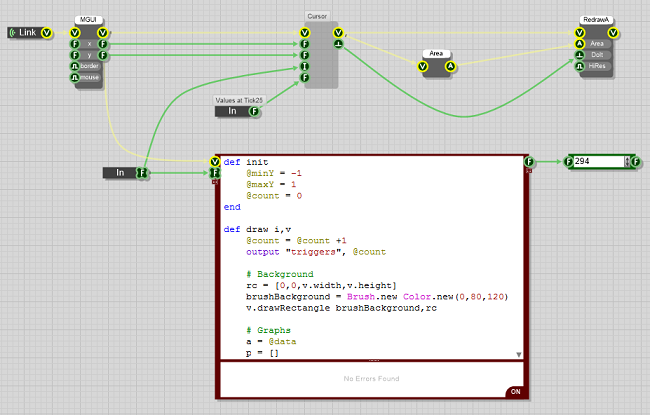
- Immagine.png (110.29 KiB) Viewed 18255 times
As you can see, the float linked to the output of Ruby component is incrementing at every tick, because the
def draw i,v function is being called (and I'm using Redraw Area; with Redraw its the same).
Re: Improving the redrawing that freeze the application
Posted: Tue Jan 12, 2016 12:13 am
by Youlean
Unfortunately I don't understand Ruby.
Actually I have done some test and it seam that Redraw and Redraw Area are the same if you don't redraw smaller area than view.
If you wan't to optimize your redrawing of line your can do two things if waveform is static:
1. Redraw only area little before and after line. This is quite tricky to implement because of redraw skipping some sections...
2. Render waveform to a bitmap.
Or do both for ultimate performance!
Re: Improving the redrawing that freeze the application
Posted: Tue Jan 12, 2016 5:53 pm
by Nowhk
Youlean wrote:Actually I have done some test and it seam that Redraw and Redraw Area are the same if you don't redraw smaller area than view.
Can you show to me a little example? Here looks always the same...
Youlean wrote:
1. Redraw only area little before and after line. This is quite tricky to implement because of redraw skipping some sections...
What do you mean with little area before and after line? The cursor?
Another idea I got is to link another prim to Waveform Ruby, and only when I got that value redraw cursor, and literally "return" the function (maybe with a flag variable) before redraw again the waveform (which the code is after the one of the cursor). Uhm...