Page 1 of 1
Bad Font Alignment
Posted: Sun Sep 28, 2014 12:00 pm
by Perfect Human Interface
I created a pixel font, but found FS can't seem to render it correctly. It should be pixel-perfect, but it's blurry. Font size is set to 1, no alignment setting, style is "regular." It simply doesn't line up to pixels.
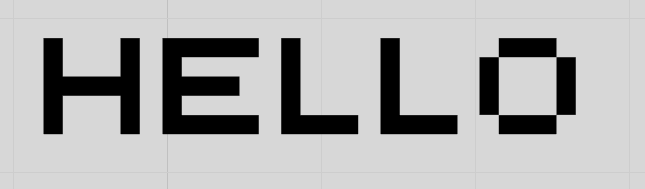
- FontAlignment.PNG (4.14 KiB) Viewed 15951 times
Not only is the placement of the text off but the spacing is too. So no hope of fixing it by setting x/y with area to float.
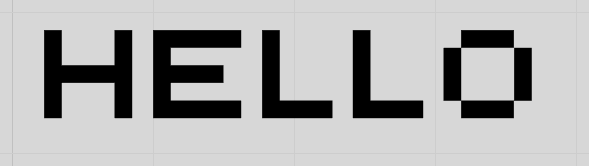
- FontAlignment2.PNG (2.97 KiB) Viewed 15951 times
It should be exactly 1 pixel between each character. You can see it's a little wider.
This font renders perfectly in Photoshop, no problem.
Not expecting a fix for this, but I thought I would at least point it out. I'm not sure if this has any real effect on most other fonts. It is kind of a bummer though as it means I can't do what I was hoping to without rendering out all the characters and then writing a code to draw them all out.
Re: Bad Font Alignment
Posted: Sun Sep 28, 2014 12:23 pm
by TheOm
In Ruby you can change the Font Rendering Method.
Use the method setTextRenderingHint with one of the follwing arguments:
"off"
"singleBitPerPixelGridFit" -try this
"singleBitPerPixel" -or this one for your font
"antiAliasGridFit" -I like this one for small font sizes and transparent background when using normal fonts
"antiAlias" -this is the default setting and looks very blurry
"clearTypeGridFit" -this usually looks best with normal fonts but doesn't work if the background is transparent
Here's also an advanced label for quick testing and comparing of these options.
Re: Bad Font Alignment
Posted: Sun Sep 28, 2014 1:22 pm
by ISounds
Hey mate do this save the fonts. So for example if another guy open my synth if i used font BLABLA. and he doesent have it. Does it still show this font blabla?
Re: Bad Font Alignment
Posted: Mon Sep 29, 2014 2:04 am
by Perfect Human Interface
TheOm wrote:In Ruby you can change the Font Rendering Method.
http://38.media.tumblr.com/tumblr_lvr97 ... r1_500.png
djbrynte wrote:Hey mate do this save the fonts. So for example if another guy open my synth if i used font BLABLA. and he doesent have it. Does it still show this font blabla?
It'll have to be installed on the machine in order for it to be used in the plugin.
...unless there's a magic Ruby function to load fonts from a folder or stored in a schematic as well.

Actually if you could just install a font from within ruby that might at least let you avoid creating an exe installer.
Re: Bad Font Alignment
Posted: Tue Mar 17, 2015 8:52 pm
by Perfect Human Interface
Hi, bumping the old thread here. I've been putting TheOm's ruby label above to good use. There's an issue though that, consistently, the label will "forget" the vertical alignment setting when the project is reloaded, and ONLY the vertical alignment (even though both vertical and horizontal alignment are being combined into one string format connector). Of course it rights itself if you send it a trigger.
Anyone know how to fix this? Continue to be baffled by Ruby load issues. :S
Re: Bad Font Alignment
Posted: Tue Mar 17, 2015 11:28 pm
by TheOm
Perfect Human Interface wrote:Continue to be baffled by Ruby load issues. :S
Sigh.. Indeed, it's really annoying

This can be fixed by adding After Load and After Duplicate.
Re: Bad Font Alignment
Posted: Tue Mar 17, 2015 11:30 pm
by Perfect Human Interface
TheOm wrote:This can be fixed it by adding After Load and After Duplicate.
Yeah, I was hoping for a more "proper" solution. I'll stick with that until then. Thanks