Page 1 of 3
How can I get input audio "value" and make a decision?
Posted: Thu Apr 16, 2015 2:36 pm
by Nowhk
I'd like to do this in FlowStone:
once an audio input signal reach a threshold (let say, 1 in Meter Bi-directional), trigger "false".
Else, when it go below 0.5, trigger "true".
Can I do it with actual FlowStone Modules or need I to make some Ruby script?
Thanks.
Re: How can I get input audio "value" and make a decision?
Posted: Thu Apr 16, 2015 2:58 pm
by KG_is_back
Code: Select all
streamin in;
streamboolout out;


out=in<0.5;
the output will be streamboolean. If you want to convert it to green, modify the mono boolean readout module.
Re: How can I get input audio "value" and make a decision?
Posted: Thu Apr 16, 2015 3:26 pm
by Nowhk
KG_is_back wrote:Code: Select all
streamin in;
streamboolout out;


out=in<0.5;
the output will be streamboolean. If you want to convert it to green, modify the mono boolean readout module.
God, you are fast enough

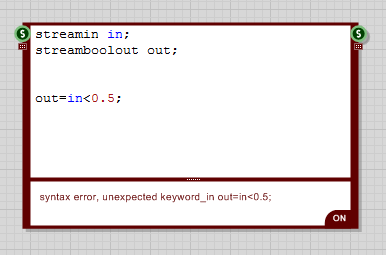
What should I need to do with that code? Insert on a ruby script?
- Immagine.png (5.96 KiB) Viewed 18450 times
Seems an error, but maybe I totally misunderstand. I'm a novice

Re: How can I get input audio "value" and make a decision?
Posted: Thu Apr 16, 2015 3:33 pm
by KG_is_back
Use DSP code component
Re: How can I get input audio "value" and make a decision?
Posted: Thu Apr 16, 2015 4:03 pm
by Nowhk
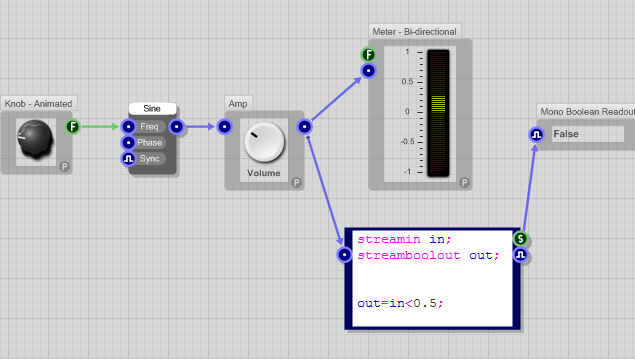
Ok. Now I got this situation for testing this:
- Immagine.png (30.37 KiB) Viewed 18445 times
Not sure I'm doing it right
I don't see any Green

What do you mean with "modify the mono boolean readout module"?
Re: How can I get input audio "value" and make a decision?
Posted: Thu Apr 16, 2015 9:12 pm
by KG_is_back
Double click the mono boolean module. Inside you will see how streams are converted to boolean. Add one output prim and connect it there.
Re: How can I get input audio "value" and make a decision?
Posted: Thu Apr 16, 2015 10:43 pm
by martinvicanek
You don't want to perform the operation on the audio signal itself but rather on the envelope (which is basically a rectified and then lowpassed audio signal). Fortunately there is a stock envelope follower module in the toolbox which you can simply place between the volume knob and the code box in your schematic above.
Another, more subtle consideration regards the implementation of a hysteresis (if I read your original post correctly). You can achieve that with the following code:
Code: Select all
streamin in;
streamboolout out;

out = (out|(in<0.5))&(in<1);
Re: How can I get input audio "value" and make a decision?
Posted: Fri Apr 17, 2015 8:29 am
by Nowhk
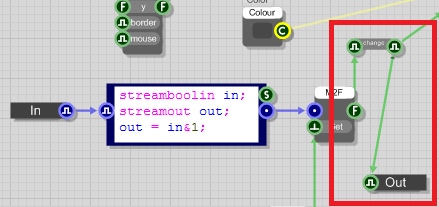
KG_is_back wrote:Double click the mono boolean module. Inside you will see how streams are converted to boolean. Add one output prim and connect it there.
In this way?
- Immagine.png (17.19 KiB) Viewed 18407 times
I see the Boolean in the output of Mono Boolean module, but it doesn't works: it doesn't trigger any bool with your method.
martinvicanek wrote:You don't want to perform the operation on the audio signal itself but rather on the envelope (which is basically a rectified and then lowpassed audio signal). Fortunately there is a stock envelope follower module in the toolbox which you can simply place between the volume knob and the code box in your schematic above.
Yes. I will place an Envelope follower when I'll make the complete plugs. Now for test also the original signal would be ok I guess.
EDIT: my actual progress is here:
- Test.fsm
- (159.24 KiB) Downloaded 836 times
Changing the volume knob does nothing

Re: How can I get input audio "value" and make a decision?
Posted: Fri Apr 17, 2015 10:52 am
by tulamide
Hey Nowhk,
I'm not sure if all details are clear to you. So pardon my descriptions, if already known:
What you see from the meter is not the actual value from the stream for several reasons.
1) The bi-directional meter is buggy. There's a "minmax" module inside it that maps all values to the 0-1 range of two directions of the meter.
2) A meter always shows as positive values. A signal of -0.5 will be shown as 0.5 just as a signal of +0.5.
3) A meter is just a slow peek at the values. Approx. 25 times per second is the signal evaluated. But a signal has 22050 values per second at least.
A signal consists of values in the range -1..+1, where 0 means no amplitude. At first I thought you'd try to establish some kind of persistent peak level meter (where the last peak is shown until a stronger peak comes in). But you are only interested in positive values in your example. Could you please tell a little bit more? What is the final goal of this test?
Re: How can I get input audio "value" and make a decision?
Posted: Fri Apr 17, 2015 10:56 am
by KG_is_back
tulamide wrote:Changing the volume knob does nothing
There is something wrong with the formula in the DSPcode part.
Unless the initial value is in 0.5-1 range this statement is always true for values below 1 and stays that way until in>1