Page 1 of 1
xy to control 4 source levels
Posted: Fri Jul 03, 2015 2:09 pm
by blatantleesly
Hi Guys,
I'm having a bit of a mental melt down as I am trying to do something that seems simple but for some reason is frying my brain, I'm trying to create a control interface that controls and mixes between 4 separate audio sources. The idea is that each corner effectively selects a source but when the position of the cursor is moved it mixes evenly between them, I have a kind of working version of this but the mix is not even between the sources. If anyone could help me getting this working that would be great or suggest a better technique to do what I am trying to achieve. Here is a basic template.
Many thanks In advance.
Re: xy to control 4 source levels
Posted: Fri Jul 03, 2015 5:22 pm
by tulamide
Here you are

Let's assume top-left stands for source 1, top-right for source 2, bottom-right for source 3, and bottom-left for source 4.
Since you use a rectangular pad and not a circular, the longest distance are the diagonals. So, if source 1 = level 1.0 then source 3 = level 0.0, etc. That also means, source 1 is not at level 0.0 when source 4 is at level 1.0
In the center they are evenly leveled. At a scale of 1 they sum up to a total level of 2.0 (4 times 0.5). If you prefer a lower total level, just look for this line
and change the number to whatever seems reasonable to you. (Example: @scale = 0.5 means the max level is 0.5, so they sum up to 1.0 when centered = 4 times 0.25)
Re: xy to control 4 source levels
Posted: Sat Jul 04, 2015 6:08 pm
by Spogg
Hi tulamide
This looks potentially very useful for Lissajou stuff and more. Unfortunately I get an error in the Ruby Component, see below.
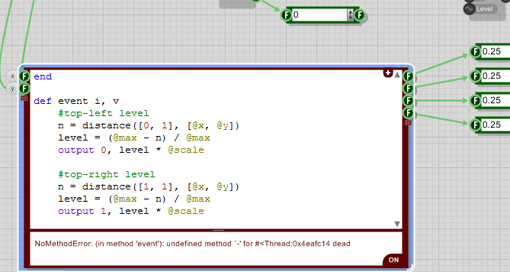
- Ruby error in 4 channel xy controller.png (65.19 KiB) Viewed 16541 times
The hex code at the end of the error line changes with the x/y position on the 'joystick' but all the 4 float output values stay at 0.25.
I'm on the latest FS 3.08.1 and I wish I knew some Ruby to fix this because it looks great!
Cheers
Spogg
Re: xy to control 4 source levels
Posted: Sat Jul 04, 2015 7:36 pm
by martinvicanek
I got the same error. If you rename x by z (both input and code) it disappears. Ugly FS bug that is!
Re: xy to control 4 source levels
Posted: Sat Jul 04, 2015 8:21 pm
by tulamide
As Martin says, we just determined '@x' being the cause. It is not the automatically generated variable that belongs to the input named 'x', but seems to be overriden by something internal. It is a bug from my point of view, since this was never before an issue and only happens under 3.0.8.1 (3.0.8 also?)
Until this is fixed, avoid naming any input 'x'
EDIT: Also, if you wish to use the RubyEdit-Code without the x/y-pad, keep in mind that this was made for that special pad, which means, it will only work correctly, if the bottom/highest y refers to 0, and the top/lowest to 1. It has to be mentioned because most of Computer graphics work the other way round (top = 0, bottom = 1)
ab (was xy) to control 4 source levels
Posted: Sat Jul 04, 2015 10:14 pm
by martinvicanek
Now that we have this sorted out let me offer a simple alternative based on bilinear interpolation.
Re: xy to control 4 source levels
Posted: Sun Jul 05, 2015 3:53 pm
by Spogg
Thanks for that Martin. Works fine for me

Cheers
Spogg
Re: xy to control 4 source levels
Posted: Mon Jul 06, 2015 4:50 pm
by blatantleesly
Thanks guys, You are lifesavers!!!!