Page 1 of 2
How do you draw precise borders around a rectangle?
Posted: Thu Jan 14, 2016 12:02 pm
by Nowhk
This is my basic code for draw a rectlangle with a small border around it:
Code: Select all
def draw i,v
	# Background
	rc = [0,0,v.width,v.height]
	brushBackground = Brush.new Color.new(69,75,79)
	v.drawRectangle brushBackground,rc

	# Border
	pb = Pen.new Color.new(255,255,255),0.5
	v.drawRoundRect pb,rc,0
end

def event i,v
	redraw 0
end
but as you can see, the borders in the bottom and right is tiny than top/left:
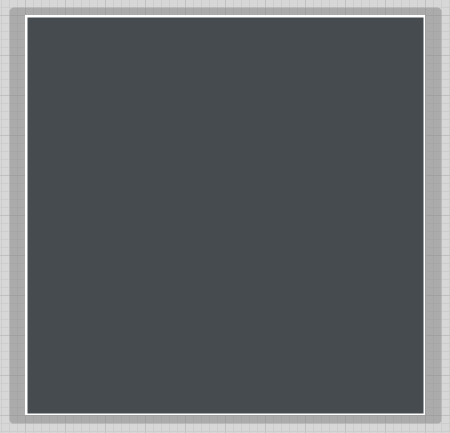
- Immagine.png (3.71 KiB) Viewed 23231 times
I don't know the reason. I've also tried to draw a rectangle within a rectangle (on the same (V)iew), but the problem is the same.
Maybe the conversion between points and pixels?
How can I do precise draw? Can I specify sizes in pixels?
I don't see any in the manual about this

Here if you want to try the example:
Re: How do you draw precise borders around a rectangle?
Posted: Thu Jan 14, 2016 1:02 pm
by Nowhk
I've tried this suggestion:
http://www.dsprobotics.com/support/view ... f=2&t=1074
but when I render the plug, the border bottom seems incorrect anyway:
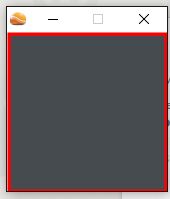
- Immagine.png (5.43 KiB) Viewed 23227 times
Code: Select all
def init
	@borderWidth = 0.4
end

def draw i,v
	# Background
	rc = [@borderWidth/2,@borderWidth/2,v.width-@borderWidth,v.height-@borderWidth]
	brushBackground = Brush.new Color.new(69,75,79)
	v.drawRectangle brushBackground,rc

	# Border
	pb = Pen.new Color.new(255,0,0),@borderWidth
	v.drawRoundRect pb,rc,0
end

def event i,v
	redraw 0
end
even thought right side is still tiny than left, even if less tiny than before...
Re: How do you draw precise borders around a rectangle?
Posted: Mon Jan 18, 2016 2:03 pm
by rocknrollkat
Oh dear, a year and a half late, but anyway, here's a screenshot from the world of v.3.0.0
I don't see a problem here, could the later versions be the cause ?
ROXY
Re: How do you draw precise borders around a rectangle?
Posted: Mon Jan 18, 2016 2:19 pm
by Nowhk
I don't know? 3.0.8 (FL) and 3.0.7 (standalone, demo) does it

Did you try with my code?
Re: How do you draw precise borders around a rectangle?
Posted: Mon Jan 18, 2016 4:57 pm
by Loopeytunes
The only work around for now that I can see is setting the "rc = [0,0,v.width,v.height]" to "rc = [-0.08,-0.08,v.width,v.height]".
It's not precise but it's a possible work around until they fix it if it is an issue with the later versions?
Re: How do you draw precise borders around a rectangle?
Posted: Mon Jan 18, 2016 6:04 pm
by Spogg
Loopeytunes wrote:The only work around for now that I can see is setting the "rc = [0,0,v.width,v.height]" to "rc = [-0.08,-0.08,v.width,v.height]".
It's not precise but it's a possible work around until they fix it if it is an issue with the later versions?
Ruby isn't my thing but I have noticed when messing with old Synthmaker non-Ruby stuff that a border may not fit correctly to the view area (FS 3.08.1). I remember fiddling around for ages trying to get a dropbox menu selector to have the right border. The right-hand and bottom edges were reduced in thickness.
It might be to do with the co-ordinates system which, I believe, start at the upper left corner. In this case if the drawing
starts at a specified width and height then the right and lower lines will be created outside of the view area. If this is the case it would mean the co-ordinates for the start positions of the right and lower edges would have to depend on the thickness specified; change the thickness and you'd have to change the co-ordinates.
I bet someone knows about this...?
Cheers
Spogg
Re: How do you draw precise borders around a rectangle?
Posted: Mon Jan 18, 2016 6:58 pm
by tulamide
What's so difficult in using the search function/Google?
http://www.dsprobotics.com/support/view ... 305#p17295
Re: How do you draw precise borders around a rectangle?
Posted: Mon Jan 18, 2016 7:17 pm
by Nowhk
But this does not address to my problem with border. Ive already set middle of the pen on the angles, but borders are still differents.
Re: How do you draw precise borders around a rectangle?
Posted: Mon Jan 18, 2016 7:34 pm
by tulamide
Nowhk wrote:
But this does not address to my problem with border. Ive already set middle of the pen on the angles, but borders are still differents.
They look different because it is drawn partly outside the view. If you want to make sure that there is no interpolation going on, try the same with pixel accurate values. If you didn't change the grid settings, 1 grid unit refers to 8 pixels. Then 0.4 means 3.2 pixels. Instead try it with multiples of 0.125 (which is 1 pixel) and see if the issue stays.
If not, then the interpolation because of subpixels were the cause and you should avoid using them.
Re: How do you draw precise borders around a rectangle?
Posted: Tue Jan 19, 2016 10:05 am
by Nowhk
tulamide wrote:Nowhk wrote:
But this does not address to my problem with border. Ive already set middle of the pen on the angles, but borders are still differents.
They look different because it is drawn partly outside the view. If you want to make sure that there is no interpolation going on, try the same with pixel accurate values. If you didn't change the grid settings, 1 grid unit refers to 8 pixels. Then 0.4 means 3.2 pixels. Instead try it with multiples of 0.125 (which is 1 pixel) and see if the issue stays.
If not, then the interpolation because of subpixels were the cause and you should avoid using them.
Thanks for the help, even if you tell me you will never help to me anymore

However, the problem happens the same. My grid is 1. I've set borderWidth 0.5 (which is a multiple of 0.125):
Code: Select all
def init
	@borderWidth = 0.5
end

def draw i,v
	# Background
	rc = [@borderWidth/2,@borderWidth/2,v.width-@borderWidth,v.height-@borderWidth]
	brushBackground = Brush.new Color.new(69,75,79)
	v.drawRectangle brushBackground,rc

	# Border
	pb = Pen.new Color.new(255,0,0),@borderWidth
	v.drawRoundRect pb,rc,0
end

def event i,v
	redraw 0
end
but I see the same. Or better: inside the schematic "maybe" it's a bit better (even if not precise at 100%; border top is slightly bigger than bottom):
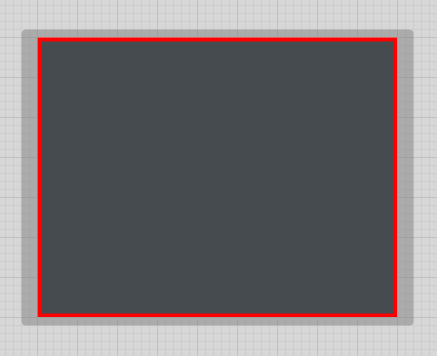
- 001.png (3.44 KiB) Viewed 23156 times
When I switch to Focus Mode (i.e. the result when I'll render the plugin) the difference is even more noticeable:
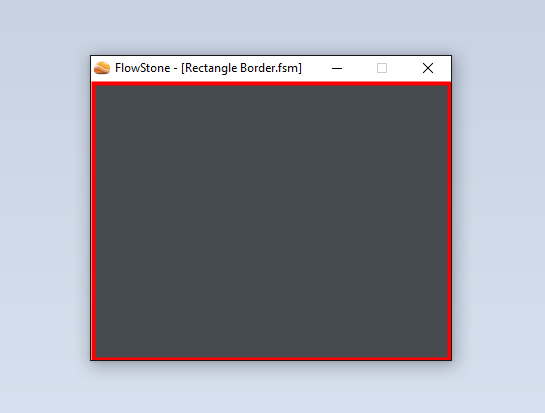
- 002.png (10.58 KiB) Viewed 23156 times
Do you see the same?